
Git-Flow Light
Git-Flow Light is a SmartGit-specific subset of Git-Flow, simplifying the branching model to just one long-lived Development trunk branch and short-lived Feature branches.
Develop Branch
The ‘develop’ branch contains the ongoing development line. It includes all finished improvements and fixes that have been merged.
Feature Branches
For each new (non-trivial) improvement that should be added to the ongoing development line, a separate feature/... branch is created (e.g., feature/my-feature).
This temporary branch works independently on the specific improvement (‘feature’).
Once the feature is complete, the commits from the ‘feature’ branch are integrated (either merged or rebased) into the develop branch, and the feature branch is usually deleted.
This way, you can see all features currently in progress by viewing the open feature/ branches.
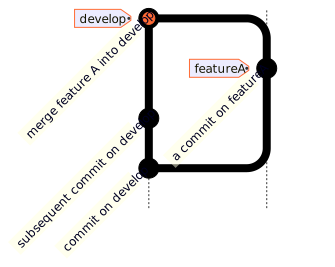
Mermaid source
%%{init: { 'gitGraph': {'mainBranchName': 'develop', 'showBranches': true, 'showCommitLabel': true, 'useMaxWidth': false}} }%%
gitGraph BT:
   commit id: "commit on develop"
   branch featureA
   checkout develop
   commit id: "subsequent commit on develop"
   checkout featureA
   commit id: "a commit on featureA" tag: "featureA"
   checkout develop
   merge featureA id: "merge feature A into develop" tag: "develop"
Configuration for Git-Flow Light in SmartGit
To start using Git-Flow Light for your repository, go to Branch | Git-Flow | Configure… and select Light (just feature branches) for Git-Flow Type.
Use Main Development Branch to choose the development line and Remote to select the remote repository.
For existing repositories, you can enter main in Main Development Branch if main is your development branch.
Since Git-Flow Light is a subset of Git-Flow, refer to the Git-Flow documentation for the meaning and purpose of each command.
Tip
For users who use a combination of Feature-Flow, Git-Flow or Git-Flow-Light, it is possible to provide a standard branch prefix for all processes in the Git Config settings.