
Cherry-Picking
The git cherry-pick command allows you to apply one or more commits from any other branch in the repository to the HEAD of the current branch.
Cherry-picking is useful when you do not wish to apply all commits on a source branch to the current branch.
If you aim to merge all commits from a source branch into the current branch, you should instead use Merge or Rebase.
In the example below, we want to cherry-pick commit C from the branch a-branch into the HEAD of the current (target) main branch.
git checkout main  # Set the current branch as the target branch
git cherry-pick C  #
This will append a new commit C', equivalent to C, onto the main branch.
Before and After Cherry-Picking:
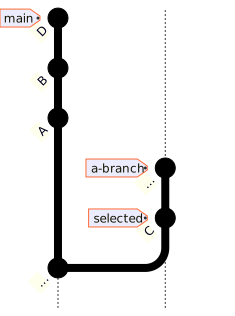
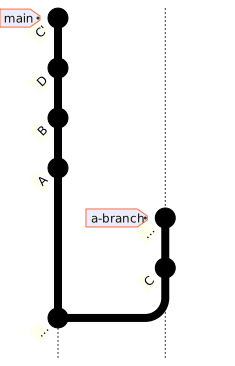
Before Mermaid source
%%{init: { 'gitGraph': {'showBranches': true, 'showCommitLabel': true, 'useMaxWidth': false}} }%%
gitGraph BT:
   commit id: "..."
   branch a-branch
   commit id: "C" tag: "selected"
   commit id: "…" tag: "a-branch"
   checkout main
   commit id: "A"
   commit id: "B"
   commit id: "D" tag: "main"
After Mermaid source
%%{init: { 'gitGraph': {'showBranches': true, 'showCommitLabel': true, 'useMaxWidth': false}} }%%
gitGraph BT:
   commit id: "..."
   branch a-branch
   commit id: "C"
   commit id: "…" tag: "a-branch"
   checkout main
   commit id: "A"
   commit id: "B"
   commit id: "D"
   commit id: "C'" tag: "main"
Note
Cherry-picking commits should be done carefully.
In the above example, after cherry-picking C, a future attempt to merge a-branch into main could result in merge-conflicts because C and C' may conflict.
If a conflict occurs during cherry-picking, the working tree will enter ‘Cherry-Picking’ status.
You’ll either need to resolve the conflict (e.g., using the SmartGit Conflict Resolver) and complete the cherry-pick or abort the cherry-pick attempt.