
Rebasing
The Git rebase command allows you to apply commits from a source branch to another target branch WITHOUT creating a merge commit, resulting in a linear commit history on the target branch.
Rebase can be viewed as more powerful version of Cherry-Pick, optimized to apply multiple commits from one branch to another.
Since rebasing can be difficult to visualize, it is recommended that you use SmartGit when rebasing, where rebase operations can be performed in the UI, e.g., by simply selecting commits and dragging them to the required parent. See Rebasing in SmartGit.
Depending on the state of the source and target branches, rebase may result in:
- Fast Forward of new commits – if there are no new commits on the target branch which are not present in the source branch, the target branch can simply be updated to ‘point’ at HEAD of the source branch without creating new commits.
- Rewritten Commits – if there are new commits in both source and target branches, Git will need to rewrite commits in the target branch (assigning new SHA hashes).
In addition, rebase allows for advanced history rewriting and cleanup operations, such as squashing, deleting and modification of existing commits.
When rebase is used with the onto parameter, additional precision can be specified as to controlling which commits are to be rewritten, as well as to change the parent commit from which a branch is created.
After a successful rebase, the HEAD of the current branch will point to the rewritten fork containing the changes.
Example
In the below common scenario, after forking at commit A, main has advanced with commits B and C, and feature has advanced independently with commits D and E.
The commits in feature cannot be fast-forwarded onto main because main and feature have diverged after A.
As we prefer a linear commit history, we wish to rebase the commits D and E (on the feature branch) onto the main branch, as follows:
git checkout feature
git rebase main
Before and After the Rebase:
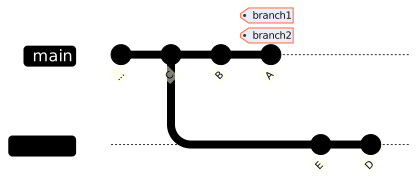
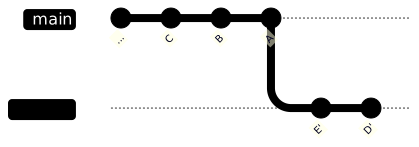
Before Mermaid source
%%{init: { 'gitGraph': {'showBranches': true, 'showCommitLabel': true, 'useMaxWidth': false}} }%%
gitGraph BT:
   commit id: "A"
   branch feature
   checkout main
   commit id: "B"
   commit id: "C" tag: "main"
   checkout feature
   commit id: "D"
   commit id: "E" tag: "feature"
After Mermaid source
%%{init: { 'gitGraph': {'showBranches': true, 'showCommitLabel': true, 'useMaxWidth': false}} }%%
gitGraph BT:
   commit id: "A"
   commit id: "B"
   commit id: "C" tag: "main"
   commit id: "D'"
   commit id: "E'" tag: "feature"
Note
- Commits
DandEare rewritten toD'andE'such that the parent ofD'is nowC(i.e. the HEAD ofmain). In this rebase scenario, Git determines the common parent commit between the branches (A) and rewritesDandEon top ofmain. - Branch
main(including commitsA,B, andC) is not modified by the rebase. - After the above rebase, it is now possible to Fast Forward
mainup to commitE'. - As can be seen, the effect is to create a linear commit history.
Rebase Onto
Rebase with the --onto switch allows for more advanced scenarios.
In the below example, since forking at commit A, main has 3 commits (D, E, and F) ahead, and feature has 2 commits (B and C) ahead.
We now wish to include commit B (currently on branch feature) into the main branch, but not to include commit C.
Additionally, we would like to specify that commit B is to be included before commits D, E, and F.
git checkout main
git rebase --onto B A
Before and After the Rebase:
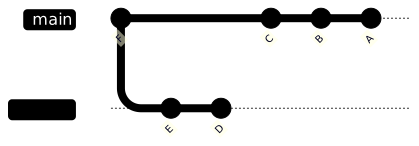
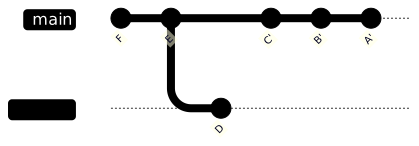
Before Mermaid source
%%{init: { 'gitGraph': {'showBranches': true, 'showCommitLabel': true, 'useMaxWidth': false}} }%%
gitGraph BT:
   commit id: "A"
   branch feature
   commit id: "B"
   commit id: "C" tag: "feature"
   checkout main
   commit id: "D"
   commit id: "E"
   commit id: "F" tag: "main"
After Mermaid source
%%{init: { 'gitGraph': {'showBranches': true, 'showCommitLabel': true, 'useMaxWidth': false}} }%%
gitGraph BT:
   commit id: "A"
   commit id: "B"
   branch feature
   checkout feature
   commit id: "C" tag: "feature"
   checkout main
   commit id: "D'"
   commit id: "E'"
   commit id: "F'" tag: "main"
Note
- The commit history of
mainwill be rewritten – although the commitsD',E', andF'have the same changes as the original commitsD,E, andFrespectively, a new SHA hash will be assigned for each commit rewritten after the rebase is completed. - The commit history of
featureis unchanged in this scenario – commitsBandCaren’t modified by the above rebase.
Interactive Rebase
Rebase with the --interactive switch allows a specified range of commits to be rewritten, and then, interactively, you will then need to specify how each commit in the range will be handled, with options such as:
- pick – i.e., to include the commit.
- reword – i.e., to include the commit but to change the commit message.
- edit – i.e., to amend the contents of the commit.
- squash – i.e., to combine the contents of the commit into the previous commit, i.e., reducing the number of commits. Squash can be applied successively, so that any number of commits are combined into one commit.
- drop – i.e., remove the commit.
Additionally, the order of the commits can be changed during an interactive rebase.
See also: Interactive Rebasing in SmartGit.